To track this trend, we measure AI diffusion as the share of people worldwide who have used a generative AI product during the reported period. This measure is derived from aggregated and anonymized Microsoft telemetry and then adjusted to reflect differences in OS and device-market share, internet penetration, and country population. Additional details on the methodology are available in our AI Diffusion technical paper. [1]
No single metric is perfect, and this one is no exception. Through the Microsoft AI Economy Institute, we continue to refine how we measure AI diffusion globally, including how adoption varies across countries in ways that best advance priorities such as scientific discovery and productivity gains. For this report, we rely on the strongest cross-country measure available today, and we expect to complement it over time with additional indicators as they emerge and mature.
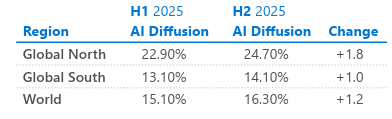
In the second half of 2025, 16.1% of the global working-age population used AI, indicating substantial room for further adoption.
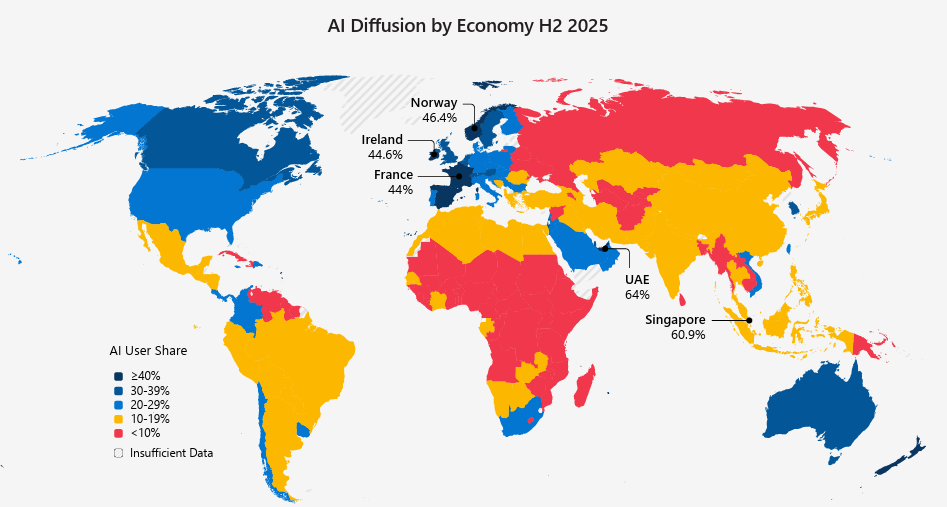
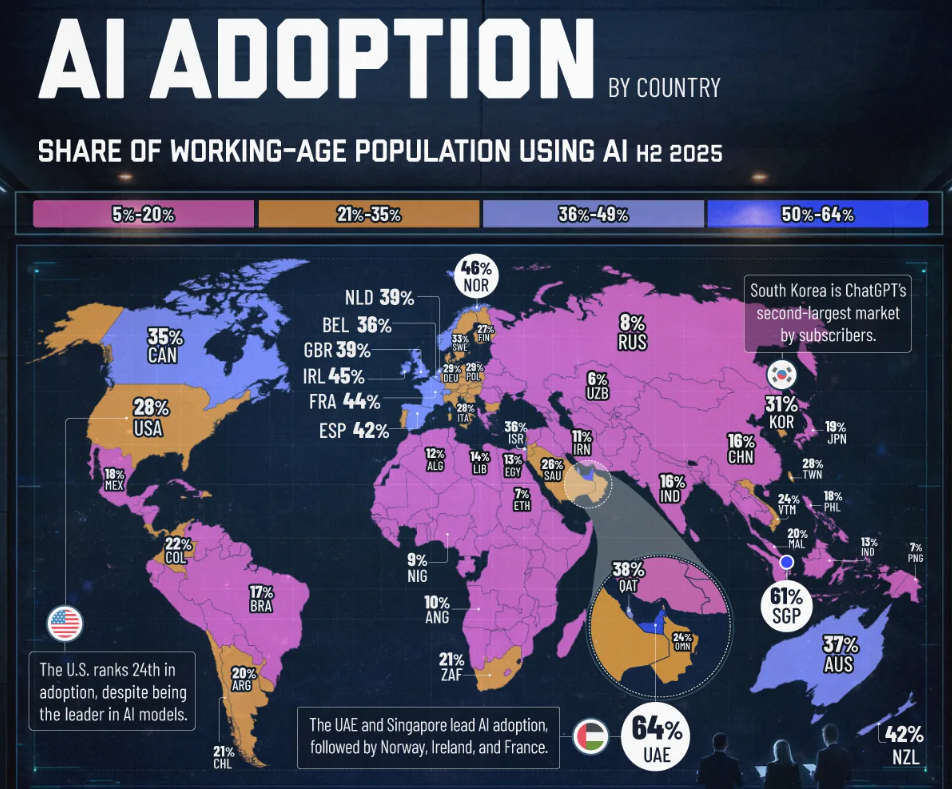
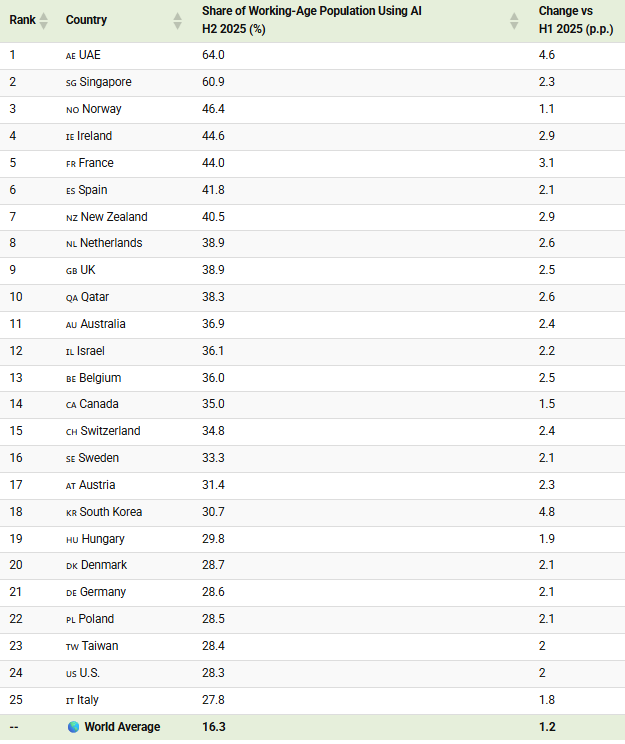
At the same time, usage varies widely across countries. Adoption rates average 24.7% in the Global North, while they are 14.1% in the Global South. Key countries stand as clear regional outliers including the UAE and Singapore.
This graphic shows AI adoption by country, based on data from the Global AI Adoption in 2025 report from Microsoft.
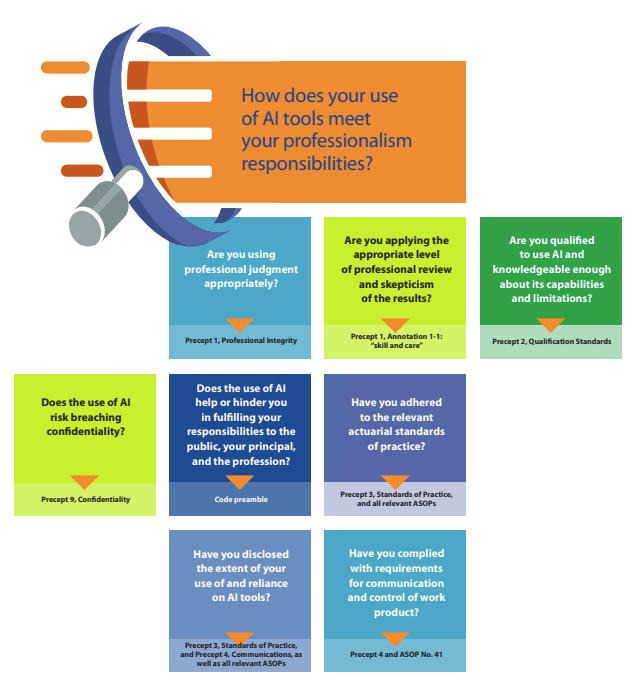
This paper describes the use and professionalism considerations for actuaries using generative artificial intelligence (GenAI) to provide actuarial services. GenAI generates text, quantitative, or image content based on training data, typically using a large language model (LLM). Examples of GenAI deployments include Open AI GPT, Google Gemini, Claude, and Meta. GenAI transforms information acquired from training data into entirely new content. In contrast, predictive AI models analyze historical quantitative data to forecast future outcomes, functioning like traditional predictive statistical models.
Actuaries have a wide range of understanding of AI. We assume the reader is broadly familiar with AI and AI model capabilities, but not necessarily a designer or expert user. In this paper, the terms “GenAI,” “AI,” “AI model(s),” and “AI tool(s)” are used interchangeably. This paper covers the professionalism fundamentals of using GenAI and only briefly discusses designing, building, and customizing GenAI systems. This paper focuses on actuaries using GenAI to support actuarial conclusions, not on minor incidental use of AI that duplicates the function of tools such as plug-ins, co-pilots, spreadsheets, internet search engines, or writing aids.
GenAI is a recent development, but the actuarial professionalism framework helps actuaries use GenAI appropriately: the Code of Professional Conduct, the Qualification Standards for Actuaries Issuing Statements of Actuarial Opinion in the United States (USQS), and the actuarial standards of practice (ASOPs). Although ASOP No. 23, Data Quality; No. 41, Actuarial Communications; and No. 56, Modeling, were developed before GenAI was widely available, each applies in situations when GenAI may now be used. The following discussion comments on these topics, focusing extensively on the application of ASOP No. 56, which provides guidance for actuaries when they are designing, developing, selecting, modifying, using, reviewing, or evaluating models. GenAI is a model; thus ASOP No. 56 applies.
The paper explores use cases and addresses conventional applications, including quantitative and qualitative analysis, as of mid-2024, rather than anticipating novel uses or combinations of applications. AI tools change quickly, so the paper focuses on principles rather than the technology. The scope of this paper does not include explaining how AI models are structured or function, nor does it offer specific guidelines on AI tools or use by the actuary in professional settings. Given the rapid rate of change within this space, the paper makes no predictions about the rapidly evolving technology, nor does it speculate on future challenges to professionalism.
Author(s): Committee on Professional Responsibility of the American Academy of Actuaries
Committee on Professional Responsibility Geoffrey C. Sandler, Chairperson Brian Donovan Richard Goehring Laura Maxwell Shawn Parks Matthew Wininger Kathleen Wong Yukki Yeung Paul Zeisler Melissa Zrelack
Artificial Intelligence Task Force Prem Boinpally Laura Maxwell Shawn Parks Fei Wang Matt Wininger Kathy Wong Yukki Yeung
Here are several examples of ChatBots and other AI applications for actuaries to try.
Answers that you might get from a general AI LLM such as ChatGPT may or may not correctly represent the latest thinking in actuarial science. These chatBots make an effort to educate the LLM with actuarial or other pertinent literature so that you can get better informed answers.
But, you need to be a critical user. Please be careful with the responses that you get from these ChatBots and let us know if you find any issues. This is still early days for the use of AI in actuarial practice and we need to learn from our experiences and move forward.
Note from meep: there are multiple Apps/Bots linked from the main site.
In August [2022], Birny Birnbaum, the executive director of the Center for Economic Justice, asked the [NAIC] Market Regulation committee to train analysts to detect “dark patterns” and to define dark patterns as an unfair and deceptive trade practice.
The term “dark patterns” refers to techniques an online service can use to get consumers to do things they would otherwise not do, according to draft August meeting notes included in the committee’s fall national meeting packet.
Dark pattern techniques include nagging; efforts to keep users from understanding and comparing prices; obscuring important information; and the “roach motel” strategy, which makes signing up for an online service much easier than canceling it.
OpenAI inside Excel? How can you use an API key to connect to an AI model from Excel? This video shows you how. You can download the files from the GitHub link above. Wouldn’t it be great to have a search box in Excel you can use to ask any question? Like to create dummy data, create a formula or ask about the cast of the The Sopranos. And then artificial intelligence provides the information directly in Excel – without any copy and pasting! In this video you’ll learn how to setup an API connection from Microsoft Excel to Open AI’s ChatGPT (GPT-3) by using Office Scripts. As a bonus I’ll show you how you can parse the result if the answer from GPT-3 is in more than 1 line. This makes it easier to use the information in Excel.
The Washington state Legislature, which has proposed legislation in the past to tackle issues such as data privacy and the use of facial recognition tech, is now reviewing a bill that would regulate the use of “automated decision systems” and AI technology within state government.
According to the bill, these systems use algorithms to analyze data to help make or support decisions that could result in discrimination against different groups or make decisions that could negatively impact constitutional or legal rights.
As a result, Senate Bill 5116 aims to regulate these systems to prevent discrimination and ban government agencies from using AI tech to profile individuals in public areas.